Topic — Eight neighbours: spiral routing on a budget
Needs: Lesson 8 — Space and time: a wavefront along a row, Lesson 11 — A grid of blocks: halo exchange and what it costs.
Lesson 11's halo exchange talks to four neighbours. Many stencils also need the four diagonal neighbours, and eight neighbours press against two fixed limits of a PE: its router has 24 colors, and its core has 8 input queues. This topic's program is Conway's Game of Life with one cell per PE. It reaches all eight neighbours with 9 colors and exactly 8 input queues, by relaying each diagonal value through the router of a neighbour.
What you will be able to do
- Route values from eight neighbours with nine colors, and explain why each PE sees eight different colors.
- Fill in a budget for a kernel: colors, input and output queues, and memory.
- Build a boundary of PEs that supplies dead cells and absorbs the wavelets that leave the grid.
- Read in a listing what a
parallelblock costs (exercise 1).
The program
Each PE holds one cell, alive (1) or dead (0). In every generation each PE sends its state to its
eight neighbours, adds up the eight states it receives, and applies the rule B3/S23: a dead cell
with exactly 3 live neighbours becomes alive, a live cell with 2 or 3 stays alive, and every other
cell is dead. Each PE records its state after every generation in history, and the timestamp
counter of lesson 3 after every generation in when.
A ring of moat PEs surrounds the W × H grid. They supply the dead cells beyond the edge, as the moats of lessons 8 and 11 supply boundary values.
| Row | Grid | Start | Generations |
|---|---|---|---|
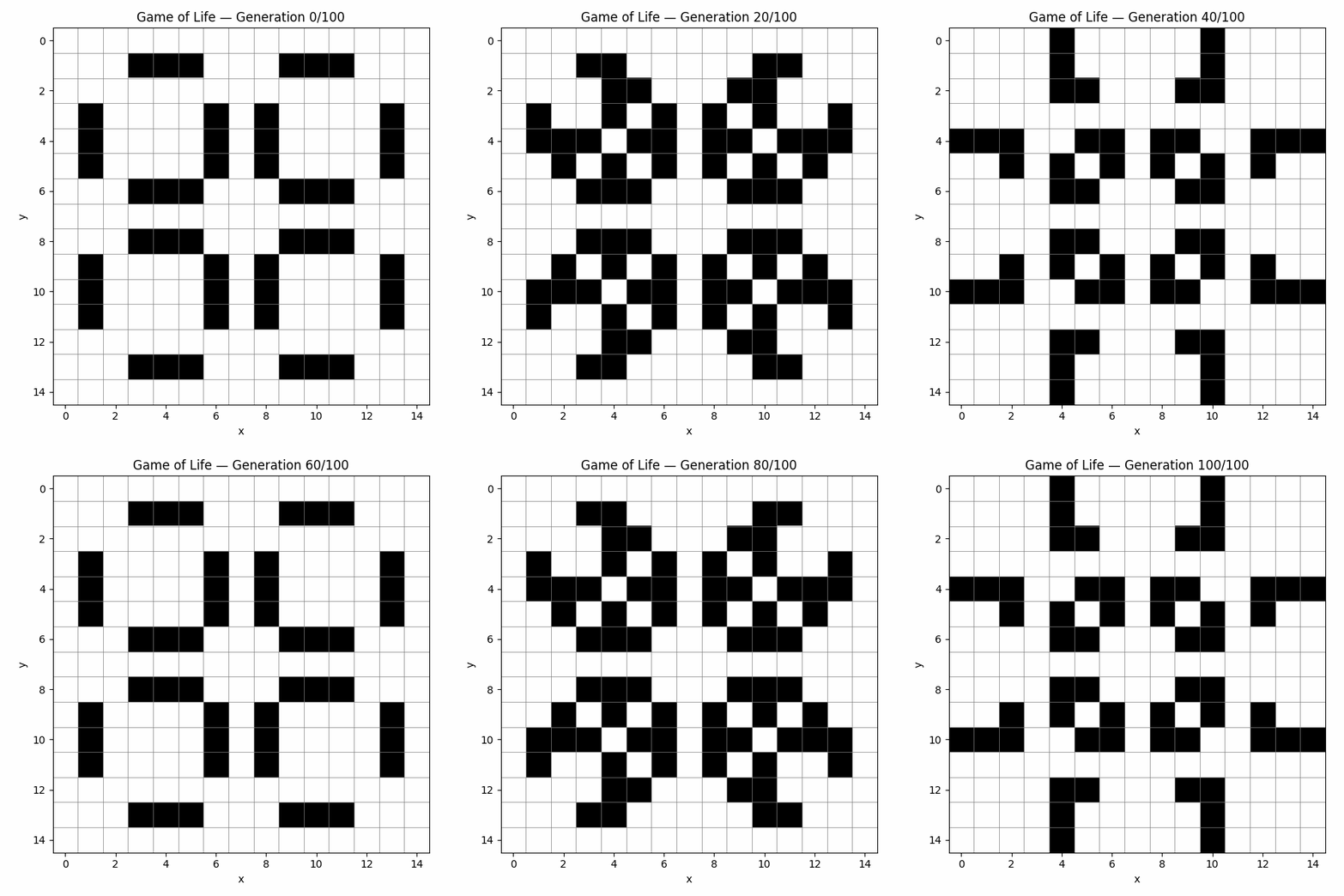
tutorial | 15 × 15 | pulsar.txt, a pattern that repeats every 3 generations | 10 |
glider | 9 × 9 | glider.txt, a glider that moves one PE toward larger x and larger y every 4 generations | 30 |
The glider reaches the grid's corner cell (8, 8) at generation 24 and is a still 2 × 2 block from
generation 27 on, so the glider row tests the boundary as well as the diagonals. ref.py steps
the start pattern on the host with dead cells beyond the edge, and compares every recorded
generation.
The routing problem
One color per direction does not work on a uniform grid. A PE would send right on one color and also receive its left neighbour's values on that color, and a color takes its input from one port at a time (lesson 4). Lesson 11 solves this for four neighbours with colorpairs, at two colors per direction. For eight neighbours that is 16 colors, and each diagonal value still needs a route with a turn.
Spiral routing gives every PE one of nine types, aa to ii, in a 3 × 3 pattern repeated
over the grid. A PE of type ee sends only on color e, and so on. Any 3 × 3 window of the grid
holds all nine types once, so a PE's eight neighbours send on eight different colors, none of them
its own.
Seen from a PE of type ee at (x, y), each neighbour's color and ee's rule for it are below.
The figure draws y growing upward, as lesson 4 does:
            x-1        x          x+1
  y+1    g  L>C     h  U>CR    i  U>C
  y      d  L>CU    e  C>RULD  f  R>CD
  y-1    a  D>C     b  D>CL    c  R>C
The port letters are Paint's: L leads to x−1, R to x+1, U to y+1 and D to y−1. Every PE
has the same nine route shapes, with the colors rotated so that each type sends on its own.
- Its own color,
e [C>RULD], goes to the four neighbours that share an edge with it. - An edge neighbour's color is consumed and relayed one more hop, at a right angle:
d [L>CU]takes the value from (x−1, y) and passes it up,f [R>CD]passes the value from (x+1, y) down,h [U>CR]passes the value from (x, y+1) right, andb [D>CL]passes the value from (x, y−1) left. - A diagonal neighbour's color arrives through such a relay. The PE at (x−1, y+1) sends
gdown to the PE at (x−1, y). That PE's rule forgisU>CR, so it consumes the value and passes it right, andeereceives it from the left withg [L>C].
A diagonal value therefore costs no color of its own, and no core instruction on the relaying PE: the router passes it on. Every relay turns the same way, counter-clockwise in this figure, hence the name.
The code
The kernel: life.w
socket tx;                                      // only sends: no input queue
socket rx0, rx1, rx2, rx3, rx4, rx5, rx6, rx7;  // 8 input queues
A socket that only sends needs no input queue, so nine sockets fit in eight queues.
    let j in [0, N);
    ∀j {
        tx[] <- cell[0];

        count <- 0;
        count <+- rx0[];
        count <+- rx1[];
        count <+- rx2[];
        count <+- rx3[];
        count <+- rx4[];
        count <+- rx5[];
        count <+- rx6[];
        count <+- rx7[];
Each PE sends its value for a generation to all eight neighbours before it waits for theirs. The eight receives then run in order. Every value a PE waits for is therefore sent eventually, even by a neighbour that is still finishing the previous generation, so the order of the receives cannot deadlock. Each receive reads its own socket in its own statement (see Pitfalls).
        if (count == 3) {
            cell[0] <- 1;
        } else if (cell[0] == 1 && count == 2) {
            cell[0] <- 1;
        } else {
            cell[0] <- 0;
        }

        history[j + 1] <- cell[0];
        when[j + 1] <- tsc[0];
tsc and tsc_control are lesson 3's timestamp counter and its control register. The body is a
serial block, the same as plain braces (lesson 5).
The moat: moat.w
let i in [0, ∞);
∀i txcolor[] <- 0;
[0, ∞) is an endless range (INF in ASCII). It repeats one transfer for ever, and its body must
be that single transfer; repeat any other body with forever (lesson 5). A moat PE sends 0 without
end. A grid PE reads one value per generation; the rest wait in the buffers, and the moat PE stalls
when they are full. The run never ends by itself: it stops at the cycle limit CYCLES from
test.rc, which must leave time for N generations.
The layout: bench.paint
spiral() paints the nine rules of the figure on a region, in the figure's layout:
define spiral(ee a b c d e f g h i) {
  ee : paint(g [L>C ]) ee : paint(h [U>CR  ]) ee : paint(i [U>C ])
  ee : paint(d [L>CU]) ee : paint(e [C>RULD]) ee : paint(f [R>CD])
  ee : paint(a [D>C ]) ee : paint(b [D>CL  ]) ee : paint(c [R>C ])
}
grid() calls it once per type, with the nine colors rotated, for example
aa : spiral(i g h c a b f d e) for type aa. lifecode() binds tx to the type's own color and
rx0 to rx7 to the other eight. grid() then stacks the nine PEs into the 3 × 3 pattern, the
first row at y = 0, and repeats it:
  let swath = stack(VERTICAL
                stack(HORIZONTAL aa bb cc)
                stack(HORIZONTAL dd ee ff)
                stack(HORIZONTAL gg hh ii))

  swath : stackrep('x HORIZONTAL split(x 3))
  swath : stackrep('y VERTICAL   split(y 3))
  swath : place(1 1 R0)
stack(VERTICAL ...) and stack(HORIZONTAL ...) are vstack and hstack, and stackrep repeats
a region as hstackrep and vstackrep do (lesson 11), here with the dimension names x and y.
split(x 3) is x / 3 rounded up; W and H must be multiples of 3, and init.py stops with an
AssertionError otherwise. place(1 1 R0) moves the grid by (1, 1) without rotating it (R0),
to leave room for the moat.
moat() builds a strip of moat PEs along each edge and one PE at each corner. A strip repeats the
types that would continue the pattern beyond the edge. Each moat PE sends its zeros with the part
of the routes the grid needs from that position, and absorbs the colors that grid PEs send towards
it. One PE of the strip at y = 0, below the grid, playing type gg:
gd:paint(g [C>UR]) gd:paint(i [L>U]) gd:paint(a [U>]) gd:paint(b [U>])
g [C>UR]sends its zeros up into the grid, and right to the next moat PE, which relays them up as a diagonal value.i [L>U]relays the zeros of the moat PE to its left up into the grid, again a diagonal.a [U>]andb [U>]name an input and no output. The router takes the wavelets that the grid PEs above send down onaandb, and passes them nowhere.
The test
init.py splits the start pattern into one file per type, and the Makefile loads each with
miset ... symbol=grid.aa.cell order="y x". After the run, ref.py reads every type's history,
rebuilds the grid of each generation, and compares it with the rule applied on the host.
cycles.py prints the cycles per generation from the first ee PE's when; it never fails. Then
the Makefile prints the first four generations.
What the hardware does: the budget
For one grid PE, from the listing:
| Resource | This kernel | A PE has |
|---|---|---|
| Colors | 9 | 24 |
| Input queues | 8, one per receive socket | 8 |
| Output queues | 1, for tx | 8 |
| Memory | about 360 words of code and data with N = 10, of which 2(N + 1) are history and when | 24,576 words (48 KB) |
The input queues are the binding limit. A ninth receive socket fails to compile with
Compiler failed to allocate input queues. Allocator needs [9] input queues (available: 8). With
all eight in use, none is doubled: queues 0 and 1 hold 8 wavelets each and queues 2 to 7 hold 4.
The colors leave room: 15 are free for other work. The relays cost router capacity but no core time.
A generation takes 57 cycles on both grids, so the time per generation does not depend on the grid
size (cycles.py prints
10 generations took 570 cycles for tutorial and 30 generations took 1709 cycles for
glider).
Run it
In your copy of the tutorial (see Lesson 1):
cd tutorial/ext-routing/eight-neighbours
make TEST=tutorial
Success is a PASS line for the row. test-tutorial/make-log then holds
PASS: all 11 generations match (15x15), the cycles per generation, and the first four
generations, row y = 0 first, each ended by -. Generations 0 and 1 of the pulsar:
      * * *       * * *

  *         *   *         *
  *         *   *         *
  *         *   *         *
      * * *       * * *

      * * *       * * *
  *         *   *         *
  *         *   *         *
  *         *   *         *

      * * *       * * *

-
        *           *
        *           *
        * *       * *

* * *     * *   * *     * * *
    *   *   *   *   *   *
        * *       * *

        * *       * *
    *   *   *   *   *   *
* * *     * *   * *     * * *

        * *       * *
        *           *
        *           *
-
make TEST='*' also runs glider. A wrong result stops at the first generation that differs,
for example FAIL: generation 1: 2 cells differ, first at x=0 y=1 (sim 0, ref 1). To draw an
animation, add a row such as
n100 N=100 W=15 H=15 PATTERN=\\\"../pulsar.txt\\\" CYCLES=20000 ARCH=sdr to test.rc and run
make test-n100/animate. With matplotlib installed it writes PNG frames, and with Pillow too an
animated GIF; without matplotlib it prints the frames as text. Run make clean after each edit.
Pitfalls
- Do not add two socket reads in one expression.
count <- rx0[] + rx1[] + ... + rx7[];compiles, and gives wrong counts from generation 1 on. The hardware cannot take both operands of one instruction from the fabric, and Carbide emits such an instruction anyway. Read each socket in its own statement, ascount <+- rx0[];does. - A ninth receive socket does not fit. Count input queues before you add a neighbour.
- W and H must be multiples of 3, the size of the pattern.
CYCLESmust cover all N generations, at 57 cycles each. The moat runs for ever, so a short limit stops the run early andref.pyreports the first generation that was not computed.
Exercises
-
Put the eight
count <+- rxN[];statements in aparallelblock. The test still passes, andcycles.pyprints 138 cycles per generation forgliderinstead of 57. Read the listing (test-tutorial/life_artefacts/life1.yeti):- Each arm becomes a task that loads
count, adds the received value and storescount. Seven arms then activate one join task each, and the eighth unblocks the first join (ublk). Each join unblocks the next, so the last join, which goes on with the loop, runs only after all eight arms. - The arms run on the main thread, one task at a time, so they never overlap. The block only adds tasks: 8 arms and 7 that join them, task IDs 9 to 23.
- Tasks 0 to 7 start when a wavelet reaches input queue 0 to 7. Tasks 8 to 30 start only when another task activates them; the block uses 15 of those 23.
Why would the program be wrong if an arm became a microthread?
- Each arm becomes a task that loads
-
A 5-point stencil reads only the four neighbours that share an edge. Count its colors and receive sockets (a) with lesson 11's colorpairs and (b) with one color per PE type, as here. For (b), give the PE at (x, y) the type (x + 2y) mod 5 and check that its four neighbours have four different types, none equal to its own. (Answer: (a) 8 colors and 4 receive sockets; (b) 5 colors and 4 receive sockets.)
Next
Topic — Data in and out: filters, fan-out and funnels spreads one stream over many rows with switches, and merges the rows back.
References
- Socket attributes: input queues, and the sockets that take none
- Infinite iterators
- Parallel and serial blocks
- Direction codes
- Paint function definitions (
define) - Placement (
place) - Replication
Source code
The Tungsten and Paint files of this example, as the toolset installs them under share/tutorial/ext-routing/eight-neighbours/. Select a line number to link to that line.